PHP连接SQL server2012,我通过代码可以通过id查询到数据库信息,但是格式很乱,怎么调整格式,把信息统一放到一张表格里?查询代码如下:
<?php

    $id = @$_GET['id'] ? $_GET['id'] : '';

    class sql{
private $serverName = "DESKTOP-9BM0PFR"; //sql server链接实例名
private $connectionInfo = array("UID"=>"sa","PWD"=>"123","Database"=>"PHP"); //配置用户名,密码,数据库
public $sql = "select *from test where id=''"; //默认的sql语句
public $result;
public $conn = '';
    public function __construct( $name ='' , $user ='' , $pwd ='' ,$db = '' ){
if( $name ){
$this->serverName = $name;
}
if( $user ){
$this->connection['UID'] = $user;
}
if( $pwd ){
$this->connection['PWD'] = $pwd;
}
if( $db ){
$this->connection['Database'] = $db;
}

//connect to sqlserver
if( !$this->conn ){
$this->conn = sqlsrv_connect( $this->serverName, $this->connectionInfo)
or die( sqlsrv_errors() );
}
}

public function doQuery( $sql ){
if(!$this->conn){
return " sorry ,can't to link server" ;
}
if( $sql ){
$this->sql = $sql ;
}
$this->result = sqlsrv_query($this->conn,$this->sql) ;
return $this->result;
}

public function close(){
if($this->conn){
sqlsrv_close ( $this->conn ) ;
}
}
}
//phpinfo();

$server = new sql();
$sql = "select *from test where id='$id' "; //sql语句写在这
$result = $server->doQuery( $sql ); //查询返回的句柄
$output = '';
if ( ! is_string( $result )){
while ( $re = sqlsrv_fetch_array ( $result )){ //sqlsrv_fetch_array 通过查询结果句柄获取查询结果
//$output[] = $re; //打印查询结果
var_dump( $re ) ;
}
}else{

     echo $result;
}


?>
运行结果如下: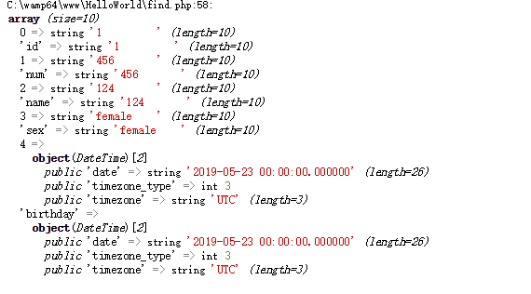
首先,你可以使用HTML中的表格标签 <table> 来把查询结果放入表格中,具体的代码如下:
$output = '<table>';
$output .= '<tr><th>id</th><th>name</th><th>age</th></tr>'; //表格头部

if ( ! is_string( $result )){
    while ( $re = sqlsrv_fetch_array ( $result )){
        $output .= '<tr>';
        $output .= '<td>'. $re['id'].'</td>';
        $output .= '<td>'. $re['name'].'</td>';
        $output .= '<td>'. $re['age'].'</td>';
        $output .= '</tr>';
    }
}else{
     $output .= '<tr><td colspan="3">'. $result .'</td></tr>'; //如果有错误,提示错误信息
}
$output .= '</table>';

echo $output;
上述代码中,使用了字符串拼接符号 . 来拼接表格中的各个元素。<tr> 表示行,<td> 表示列,<th> 表示表格头部。在拼接元素时,还使用了结果集中的字段名,即 $re['字段名'],如 $re['id'] 即表示查询结果中的 id 列。
最后,把拼接好的表格 $output 打印输出即可。